
Bulk Tooling
Bulk digital business card tooling for teams who need scale
Import from your directory. Apply your brand. Distribute in one click. Stay in sync as your team changes.
Built for teams from 50 to 5,000 employees.
 Entra ID
 Google Workspace
Trusted by teams at




The problem
Most digital business card tools weren't built for teams at scale
Most digital business card tools are built for individuals, with bulk capabilities bolted on as an afterthought. Manual user creation, brand drift across cards, distribution delays, and no way to keep cards in sync as roles change.
Social Card was built for teams from day one. Every step from import to sync was designed to work at the scale your team actually operates at.
End-to-end
End-to-end bulk lifecycle for digital business cards
Whether you're rolling out to 50 employees or 5,000, every step is built for scale.
Bring your team in from anywhere data lives.
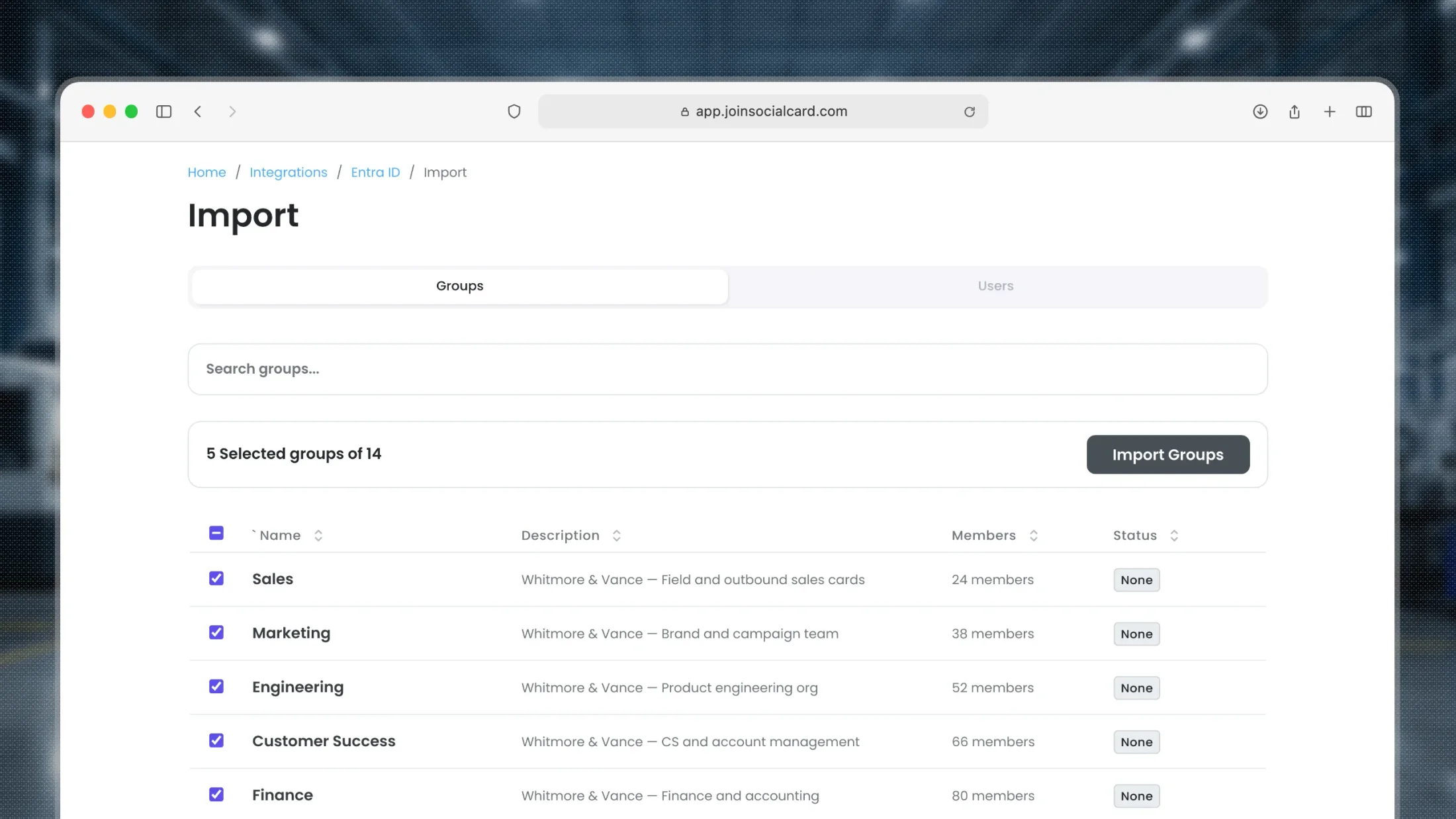
- Microsoft Entra ID: pull whole groups (Sales, US-East, Customer Success) without leaving Social Card
- Google Workspace: import organizational units with names, emails, titles, and contact details
- CSV upload: columns map automatically with a confidence score, errors resolve inline, fastest path for teams without a connected directory
- One template defines colors, layout, contact fields, and CTAs
- Every team member gets a card that reflects your brand guidelines by default
- Templates are version-controlled: push an update and every connected card refreshes in seconds
- Each person gets web page, wallet pass, QR code, and email signature in a single rollout
- Native share, copy fallback, and preview-before-send across every surface
- Bulk distribute via email, with delivery status tracked per recipient
- Group by department, region, or role, kept accurate by your directory
- Scope permissions and edits down to a team or a single person
- Edit, export, or deactivate in bulk against any filtered view, with selections held across pages
- Real-time template sync: change a logo or title and every connected card refreshes in seconds
- Scheduled directory sync rolls in new hires and deactivates departures, no manual queue (Enterprise)
- Status badges, override warnings, and last-sync state visible per recipient
Bulk import
Bulk import from anywhere your team data lives
Match the import method to your existing infrastructure. Schedule recurring syncs to automate ongoing roster updates.
CSV upload
Upload a spreadsheet. Columns map to fields automatically with a confidence score, so review is limited to the ones that need it. Resolve errors inline. The fastest way to import a team that doesn't yet have a directory connected.
Microsoft Entra ID
One-click directory pull from your existing Entra ID tenant. Sync entire groups (Sales, US-East, Customer Success) without leaving Social Card.
Google Workspace
Import from Google Workspace organizational units. Pull names, emails, titles, and contact details automatically.
Schedule recurring syncs
Set Entra ID or Google Workspace to sync on a recurring schedule. New hires get cards automatically. No manual import required.
Why teams choose Social Card
Built for teams. Built for scale. Built for ease.
Built for teams from day one
Bulk-first architecture, not retrofitted from an individual product. Every feature, from import to templates to distribution to sync, was designed for rollout at scale.
No employee logins
Cards are public-access. Only admins authenticate. No passwords, MFA, or account lifecycle management for the workforce. Less work for IT. Zero friction for employees.
Native directory sync
Direct integrations with Microsoft Entra ID and Google Workspace, with scheduled recurring sync. Your roster stays current automatically.
Bulk import and directory integrations available on Business and Enterprise. Scheduled sync available on Enterprise.
FAQ
Questions we hear from teams rolling out at scale
Our team is here to walk you through bulk import, distribution, and sync.
Bulk without all the bloat.
Book a demo and we'll walk you through import, templates, distribution, and sync configured for your team.